Summer activities in Edinburgh

All activities are free of charge and are only available to single parent/ carer families.

At a glance!

Date:

30 June 2026

7 July 2026

15 July 2026

20 July 2026

30 July 2026
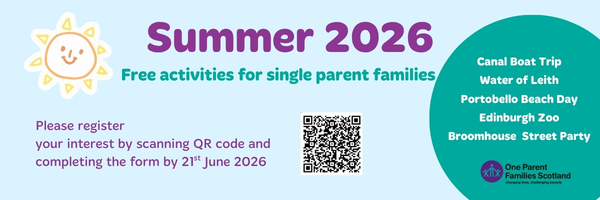
We are delighted to invite you and your children to our summer activities programme that we have put together here at OPFS Edinburgh.

  • 30th June Tuesday morning and afternoon – All Aboard – Canal Boat Trip, two sessions available
  • 7th July Tuesday 10:00-12:00pm – Water of Leith Visitor Centre – outdoor adventure with the rangers
  • 15th July Wednesday, 11:00am – Portobello Beach Day – games and picnic
  • 20th July Monday, 10:30am – Edinburgh Zoo
  • 30th July Thursday, 11:00am – Nature Walk from Slateford to Saughton park

We will round off the summer holidays with the Broomhouse Street Party at The Space on 6th August. There will be face painting, snacks, and a range of fun, family-friendly activities. Everyone is welcome, and there is no need to sign up, although letting us know if you plan to attend would be appreciated.

How to register

To register, please use the link below by midnight on Sunday 21st June:

OPFS Holiday Activities - Summer 2026
Exit this
site now
Privacy Overview

This website uses cookies so that we can provide you with the best user experience possible. Cookie information is stored in your browser and performs functions such as recognising you when you return to our website and helping our team to understand which sections of the website you find most interesting and useful.

View Privacy policy

Covering your tracks

You may not want other people to know that you’ve been searching for information or help from OPFS.

When browsing the internet whether on a mobile phone, tablet or computer, you leave a ‘history’ trail of pages and sites you’ve visited.

It’s impossible to completely avoid being tracked online but if you’re worried about someone knowing which sites you’ve been looking at, there are some things you can do to help cover your tracks.

If you’re using a laptop or desktop computer, try keeping another document or website open in a new tab or window while browsing. If someone comes in the room and you don’t want them to see what you’re looking at, you can quickly switch to another window or tab.

Deleting browsing history

You can delete the history of websites you’ve visited, but it’s important to know that if you delete your browsing history, someone else using the same device may notice.

If you share a tablet, mobile phone, laptop or computer with someone, they might notice that passwords or website addresses have disappeared from their history.

Find out how to remove your browsing history and other data from some of the most commonly used browsers:

Browsing in Private mode (incognito)

When browsing ‘incognito’, the internet browser won’t store cookies or record your browsing history on the computer, mobile or tablet.

This option is available on popular web browsers i.e. -

Toolbars

If you use a search toolbar in your web browser, remember that your searched items can be saved as part of your history. Find out how to delete your searched items from the following search engines: